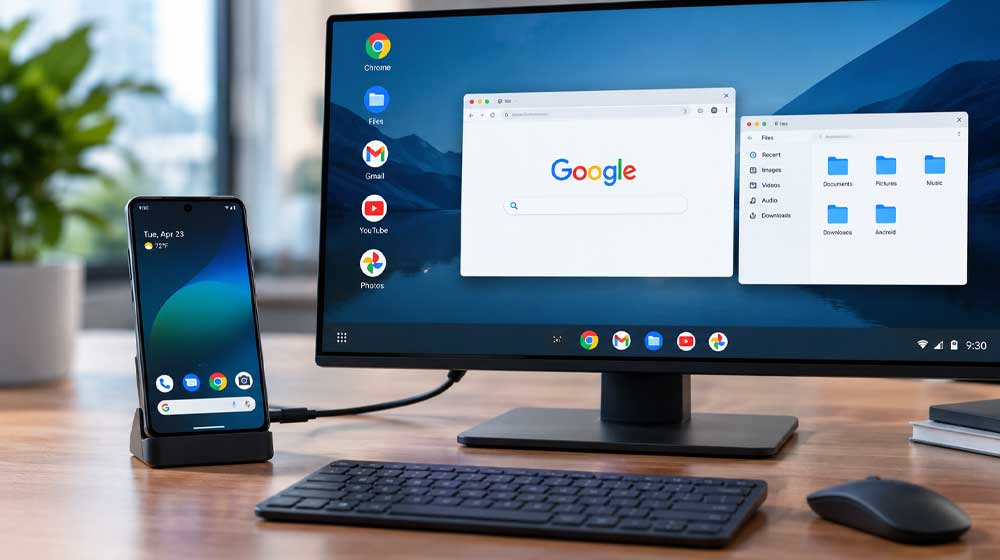
Google has added a PC-like interface to the Pixel 8 and newer Pixel phones through the Android 16 March Pixel Drop. Engadget reported that supported devices can now show Android Desktop Mode on an external monitor. The feature is part of base Android, so it will likely reach other phones. However, Google has not said when Desktop Mode will arrive on non-Pixel devices.
The feature also follows years of attempts to make phones replace desktops. Earlier examples included Asus’ PadFone, Motorola’s Atrix Lapdock, Microsoft Continuum, Samsung DeX and Motorola Smart Connect. Now Google offers its own built-in version.
How Android Desktop Mode Works
Users connect a Pixel 8 or newer phone to an external monitor with a high-speed USB-C cable. A prompt then asks whether to mirror the display or switch to Desktop Mode. Selecting Desktop Mode opens a desktop-style workspace. Meanwhile, keyboards and mice can connect through Bluetooth or a USB hub.
Apps open inside resizable windows, and a Start menu provides access to the App Drawer. Notifications remain available by pulling down from the top of the interface. ZDNet reported that Desktop Mode ran smoothly while handling multiple applications. Furthermore, the window arrangement returns after reconnecting, provided the apps stayed open on the phone.
Users cannot currently pin apps to the desktop home screen, so they must open them from the Start menu. Most Android games rely on touchscreen controls and lack keyboard support. Still, content creator leepspvideo showed Steam games running through Desktop Mode with tools such as GameNative.
The Limitations
The experience currently depends heavily on the workload. Basic tasks such as document editing and YouTube playback run smoothly. However, demanding jobs such as photo editing may cause problems. How-To Geek found that the software limits output to 60Hz, while Reddit users reported no 4K support.
Desktop Mode also lacks Chrome extension support. Therefore, tools such as Grammarly and OneTab cannot work as they do on traditional desktop Chrome. Android Police reported that a Pixel phone got hot to the touch after around 30 minutes of light use. Running several floating windows also strains the phone more and could increase battery wear during long sessions.
Despite these limits, Desktop Mode gives newer Pixel phones a built-in desktop-style workspace through an external display. Finally, future software updates could improve the feature since it is still new. Other Android makers may also build their own versions with better execution.